
In the modern software industry, businesses need to release new features, updates, and improvements faster than ever. Customers expect applications to work smoothly, security issues need to be fixed quickly, and companies must constantly improve their products to stay competitive. This is where Continuous Deployment has become an important part of modern software development.
Continuous Deployment is a development practice that allows software changes to be automatically tested and released to production whenever they successfully pass the required checks. Instead of waiting for a team to manually approve and deploy every update, an automated pipeline handles much of the process.
For development teams, this approach can make software delivery faster, more reliable, and more consistent. However, successful Continuous Deployment requires more than simply automating a deployment command. Teams also need strong testing, monitoring, security practices, and a culture that supports frequent releases.
What Is Continuous Deployment?
Continuous Deployment is a software development approach in which code changes that pass automated tests and other quality checks are automatically deployed to the production environment.
Imagine a developer makes a small change to an application and pushes the updated code to a shared repository. An automated system can then build the application, run tests, check the code, and verify that it meets predefined requirements. If everything passes, the system can automatically release the change to users.
This creates a continuous flow from development to production.
The key idea is automation. Developers do not have to manually perform the same deployment steps every time a change is ready. Instead, the deployment pipeline performs these tasks consistently.
Continuous Deployment is closely related to Continuous Integration and Continuous Delivery, but the three concepts are not exactly the same.
Continuous Deployment vs. Continuous Delivery
These terms are often used together, which can make them confusing.
Continuous Integration (CI) focuses on regularly integrating code changes into a shared repository and automatically testing those changes. The goal is to identify problems early.
Continuous Delivery (CD) takes the process further by keeping software in a production-ready state. Code can be automatically built and tested, but a human may still need to approve the final production release.
Continuous Deployment goes one step further. When a change passes the required automated checks, it is automatically deployed to production without requiring manual approval for each release.
In simple terms:
- Continuous Integration helps teams integrate and test code frequently.
- Continuous Delivery keeps tested software ready for release.
- Continuous Deployment automatically releases successful changes to production.
The right approach depends on the organization, its risk level, and its technical environment.
How Does Continuous Deployment Work?
A Continuous Deployment workflow usually starts when a developer commits and pushes code to a version control system.
The deployment pipeline then performs several automated steps. First, the application may be compiled or packaged. Automated tests are then executed to determine whether the new code behaves as expected.
Depending on the project, the pipeline can include unit tests, integration tests, security checks, performance tests, and other quality controls.
If the change passes all required checks, the deployment process can automatically move it into production.
After deployment, monitoring tools can observe the application and report issues such as increased error rates, slow response times, or unexpected system behavior.
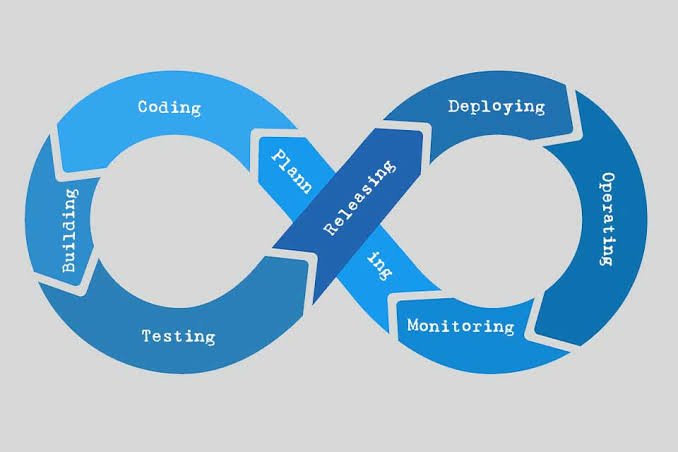
A simplified workflow looks like this:
Code Change → Build → Automated Tests → Security and Quality Checks → Deployment → Monitoring
This process can happen many times a day, depending on the team’s development practices.
Benefits of Continuous Deployment
One of the biggest advantages of Continuous Deployment is speed. Development teams can release small improvements without waiting for a large release cycle.
Instead of collecting dozens or hundreds of changes and releasing them together, teams can deliver smaller updates more frequently. Smaller releases can also make problems easier to identify because there are fewer changes to investigate.
Another important benefit is consistency. Manual deployments can involve repetitive steps, and repetitive processes can lead to human errors. Automation allows the same deployment procedure to be followed every time.
Continuous Deployment can also improve the feedback loop between developers and users. When a new feature or improvement reaches production quickly, teams can collect real-world feedback sooner.
There can also be business benefits. Companies that can safely deliver improvements faster may respond more quickly to customer needs and changing market conditions.
The Role of Automated Testing
Automated testing is one of the foundations of successful Continuous Deployment.
Automatically deploying every code change without reliable tests would create unnecessary risk. A faulty change could reach production before anyone notices the problem.
For this reason, teams usually create multiple layers of automated tests.
Unit tests can verify individual components or functions. Integration tests can check whether different parts of an application work correctly together. End-to-end tests can simulate real user workflows.
Security and performance checks can provide additional protection.
The goal is not to create an enormous number of tests simply for the sake of testing. Instead, teams should build a useful test suite that provides confidence that a change is safe to release.
Monitoring Is Just as Important
Deployment does not end when the new version reaches production.
A strong Continuous Deployment strategy includes continuous monitoring. Once an update is released, teams need to know whether the application is behaving normally.
Monitoring can track metrics such as application errors, response times, resource usage, traffic, and service availability.
Logs can also help developers understand what is happening inside the system.
If an unexpected problem appears after deployment, automated alerts can notify the appropriate team. In some environments, automated systems can even roll back a problematic release.
This is why monitoring and observability are important parts of a mature deployment process.
Challenges of Continuous Deployment
Although Continuous Deployment provides many benefits, it is not suitable for every organization or project without careful planning.
One common challenge is insufficient test coverage. If important parts of an application are not tested automatically, the deployment pipeline may provide a false sense of security.
Another challenge is infrastructure complexity. Large applications may involve databases, cloud services, APIs, containers, and multiple independent services. Automating deployments across all these components requires careful engineering.
Security is another major concern. An automated pipeline has access to important systems and credentials, so it must be properly secured. Access controls, secret management, code scanning, and other security practices should be considered.
There is also a cultural challenge. Teams accustomed to manual releases may initially feel uncomfortable with automatic production deployments. Developers, testers, operations teams, and business stakeholders need to understand how the process works and what safeguards are in place.
Best Practices for Continuous Deployment
Organizations can make Continuous Deployment more reliable by following several practical principles.
Keep Changes Small
Small changes are generally easier to test, review, monitor, and troubleshoot. Developers should avoid combining unrelated changes into one large release whenever possible.
Build a Strong Test Pipeline
Automated tests should run consistently before production deployment. Teams should regularly improve their test suites as the application evolves.
Use Feature Flags
Feature flags can allow teams to deploy code without immediately making a feature available to every user. This can provide additional control over releases.
Monitor Production Closely
Teams should monitor important application metrics after every deployment. Automated alerts can help detect problems quickly.
Have a Rollback Strategy
Even well-tested software can sometimes behave unexpectedly in production. A reliable rollback or recovery strategy can reduce the impact of failed releases.
Protect the Pipeline
Deployment pipelines should be treated as critical infrastructure. Access should be restricted, credentials should be protected, and security checks should be included in the process.
Is Continuous Deployment Right for Every Business?
Not necessarily.
Continuous Deployment works particularly well for teams that release software frequently and have strong automated testing and monitoring systems.
However, some organizations operate in environments where every production change requires additional review or regulatory approval. In such situations, Continuous Delivery may be more appropriate than fully automatic deployment.
The important point is that automation should support the organization’s goals rather than becoming a goal by itself.
A financial platform, healthcare system, or safety-critical application may need additional controls before changes reach production. Meanwhile, a consumer web application may be able to deploy small updates several times a day.
Continuous Deployment and DevOps
Continuous Deployment is strongly connected to the DevOps philosophy.
DevOps encourages development and operations teams to work together rather than treating software development, testing, and deployment as completely separate activities.
Automation helps remove unnecessary barriers between these stages. Developers can receive faster feedback, operations teams can use standardized processes, and organizations can create a more efficient software delivery lifecycle.
However, technology alone does not create successful DevOps practices. Communication, collaboration, accountability, and continuous improvement are equally important.
The Future of Continuous Deployment
As cloud computing, containers, infrastructure automation, and artificial intelligence continue to evolve, software deployment is becoming increasingly automated.
Modern development teams are moving toward systems that can detect problems, analyze application behavior, and respond to certain issues automatically.
At the same time, security is becoming more deeply integrated into development pipelines. This approach, often associated with DevSecOps, helps organizations identify security problems earlier instead of waiting until the final stages of development.
The future of Continuous Deployment is therefore not simply about deploying code faster. It is about creating a reliable system where software can move from development to production safely, efficiently, and with minimal manual effort.
Conclusion
Continuous Deployment has changed the way many software teams deliver applications. By automatically testing and releasing successful code changes, organizations can shorten development cycles, reduce manual work, and respond more quickly to customer needs.
However, automatic deployment should never mean automatic risk. Strong testing, monitoring, security controls, reliable infrastructure, and recovery strategies are essential for making the approach successful.
When implemented thoughtfully, Continuous Deployment can become more than a technical process. It can help create a development culture based on smaller changes, faster feedback, continuous improvement, and reliable software delivery.
For businesses that want to compete in a fast-moving digital environment, learning how to implement Continuous Deployment effectively can be a valuable step toward building a faster and more resilient software development process.