
Cloud computing has changed the way businesses manage applications, store information, and support employees working from different locations. Organizations can now access their systems through cloud platforms without depending entirely on traditional office networks or physical servers. While this flexibility offers many advantages, it also creates new security challenges.
Employees may connect from home, applications may run across multiple cloud environments, and sensitive data may be shared between different services. In such an environment, simply trusting someone because they are connected to the company network is no longer enough.
This is where Zero Trust security becomes important.
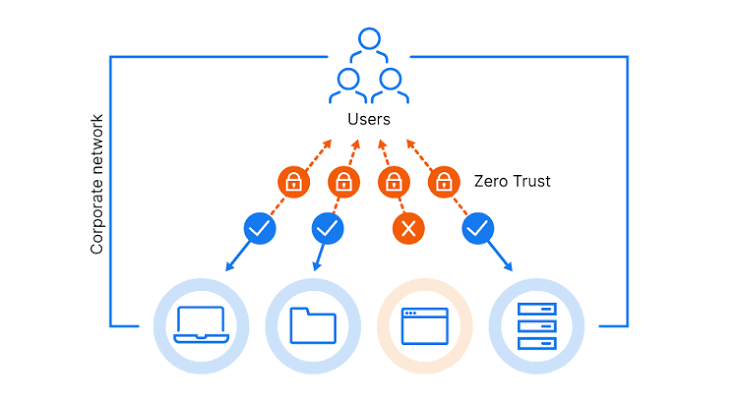
Zero Trust is a security approach based on a simple principle: never automatically trust a user, device, or application just because it is inside a network or has successfully connected before. Every access request must be evaluated according to identity, permissions, device security, context, and the sensitivity of the requested resource.
For businesses moving toward cloud-based operations, Zero Trust can provide a more flexible and effective way to protect sensitive information and reduce the risk of unauthorized access.
In this article, we will explain what Zero Trust security is, how it works in the cloud, its main benefits, common challenges, and practical steps for implementing it successfully.
What Is Zero Trust Security?
Zero Trust security is a cybersecurity model that requires organizations to verify access requests explicitly and limit access to only what is necessary.
Traditional security models often rely on a trusted internal network protected by firewalls. Once users or devices enter that network, they may receive relatively broad access to internal resources.
This approach can create problems when an attacker compromises an employee account or gains access to a device connected to the network. If the compromised identity has extensive permissions, the attacker may be able to move between systems and access sensitive information.
Zero Trust takes a different approach. Instead of assuming that a user or device is trustworthy, it evaluates each access request based on relevant security signals and policies.
For example, an employee may be permitted to access a project management application but denied access to a financial database because their role does not require it.
Even if the employee has successfully logged in, the system can still consider whether the device meets security requirements or whether the request presents unusual risk.
Zero Trust does not mean that every user must repeatedly enter a password for every action. It means that access decisions should be based on appropriate verification, authorization, and ongoing assessment rather than an assumption of trust.
In cloud environments, this approach is particularly useful because users, applications, data, and infrastructure are distributed across different locations and services.
Why Does Zero Trust Matter in Cloud Computing?
Cloud environments differ from traditional IT environments in several important ways.
Applications may run across multiple regions, employees may work remotely, and organizations may rely on several cloud providers. In addition, third-party services and automated workloads often need access to business systems.
These changes make it difficult to rely on a single network boundary for security.
Here are some of the main reasons Zero Trust matters in cloud computing.
1. Cloud Resources Are Accessible From Different Locations
Cloud applications can often be accessed through the internet, which makes them convenient for employees and customers.
However, internet accessibility also increases the importance of strong identity verification, appropriate permissions, and secure application configurations.
Zero Trust helps organizations evaluate access based on the user, device, application, and context rather than relying only on network location.
2. Stolen Credentials Can Create Serious Risks
Cybercriminals frequently attempt to obtain passwords, authentication tokens, and other credentials through phishing and account compromise.
If an attacker gains control of a legitimate account, traditional access controls may not always distinguish the attacker from the real user.
Zero Trust can reduce this risk through multifactor authentication, risk-based access policies, limited permissions, and monitoring for suspicious behavior.
These controls cannot guarantee that every compromised account will be blocked, but they can make unauthorized access more difficult and limit its potential impact.
3. Businesses Use Multiple Cloud Services
Many organizations rely on a combination of cloud infrastructure, software-as-a-service applications, internal systems, and third-party integrations.
Each service may have its own identity controls and access settings.
A Zero Trust strategy helps organizations establish consistent access policies across these environments and reduce unnecessary permissions between connected systems.
4. Remote Work Requires Flexible Security
Employees no longer need to work from a company office to perform their jobs.
They may access business applications from home, while traveling, or from other approved locations.
Zero Trust supports this flexibility by evaluating identity, device health, and access context rather than assuming that someone is trustworthy simply because they are connected to the corporate network.
5. Security Incidents Can Spread Between Systems
When an attacker gains access to one account or application, excessive permissions and unrestricted internal communication can allow the incident to spread.
Zero Trust encourages organizations to restrict access between systems and separate sensitive workloads.
This can help contain an incident and reduce the amount of information or infrastructure an attacker can reach.
How Does Zero Trust Security Work in the Cloud?
Zero Trust works by combining identity verification, access controls, device assessment, network restrictions, and continuous monitoring.
Instead of treating access as a single decision made when someone enters a network, the model evaluates whether a particular request should be allowed under the organization’s security policies.
Consider an employee who wants to access a cloud-based financial application.
The system might evaluate whether the employee’s identity is verified, whether multifactor authentication has been completed, whether the device meets security requirements, and whether the employee’s role permits access to the requested information.
If the request satisfies the relevant policies, access can be granted. If the request presents unacceptable risk, the system may deny access or require additional verification.
The exact process depends on the organization’s architecture and the capabilities of its security tools.
The Main Components of Zero Trust
<box gap={3}> <row align=start gap={3}> <AsyncImage query=”cybersecurity identity verification authentication login illustration” aspectRatio=”4:3″ width=”112px”/> <box flex=”1″ gap={1}> 1. Identity Verification
The organization verifies users and workloads through identity providers, authentication methods, and other relevant security signals. Multifactor authentication provides an additional layer of protection beyond passwords. </box> </row> <divider color=”subtle”/> <row align=start gap={3}> <AsyncImage query=”cybersecurity access control permissions shield digital illustration” aspectRatio=”4:3″ width=”112px”/> <box flex=”1″ gap={1}> 2. Least-Privilege Access
Users and applications receive only the permissions needed to perform their tasks. This limits the damage that can result from a compromised account or service. </box> </row> <divider color=”subtle”/> <row align=start gap={3}> <AsyncImage query=”endpoint device security laptop health check cybersecurity illustration” aspectRatio=”4:3″ width=”112px”/> <box flex=”1″ gap={1}> 3. Device Security
Access policies can consider whether a device is managed, updated, encrypted, and protected by approved security software. Devices that fail required checks may receive restricted access. </box> </row> <divider color=”subtle”/> <row align=start gap={3}> <AsyncImage query=”microsegmentation cloud network security architecture diagram illustration” aspectRatio=”4:3″ width=”112px”/> <box flex=”1″ gap={1}> 4. Network and Workload Segmentation
Applications, databases, and other resources are separated so that access between them is limited to approved communication paths. A compromise in one area is less likely to expose the entire environment. </box> </row> <divider color=”subtle”/> <row align=start gap={3}> <AsyncImage query=”cloud cybersecurity monitoring dashboard threat detection illustration” aspectRatio=”4:3″ width=”112px”/> <box flex=”1″ gap={1}> 5. Continuous Monitoring
Security systems collect information about authentication, access requests, configuration changes, and suspicious activity. Relevant signals can be used to reassess risk and trigger additional controls. </box> </row> </box>
Together, these components create a security model in which access is limited, verified, and monitored instead of automatically trusted.
The Core Principles of Zero Trust Security
A successful Zero Trust strategy is based on several important principles.
Verify Explicitly
Access decisions should use available and relevant information about the user, device, requested resource, and circumstances of the request.
Depending on the system, this may include identity verification, authentication strength, device compliance, location, and signs of suspicious activity.
Verification should be appropriate to the sensitivity of the resource. Access to a low-risk public application may require different controls from access to sensitive financial records.
Use Least-Privilege Access
Users and applications should receive the minimum permissions necessary for their responsibilities.
For example, a customer support employee may need to view selected customer records but should not automatically have permission to export an entire database.
The same principle applies to applications and automated workloads. A background service should not receive broad administrative access when it only needs to read a particular queue or update a specific database.
Assume a Breach
Zero Trust operates on the assumption that an attacker may eventually compromise an account, device, or application.
Rather than relying on a single protective boundary, organizations should design systems to limit what an attacker can access after an initial compromise.
This involves separating workloads, protecting sensitive data, monitoring activity, and restricting access between systems.
Make Access Decisions Context-Aware
A user’s permissions are important, but the context of a request can also matter.
For example, a login from a recognized, managed device may present a different risk from an unusual login attempt involving a privileged account.
Context-aware policies can require additional authentication, restrict certain actions, or deny access when specific risk conditions are detected.
These decisions should be designed carefully to avoid unnecessary disruption to legitimate users.
Zero Trust vs. Traditional Security: What Is the Difference?
Traditional network security often focuses on protecting the boundary between a trusted internal network and untrusted external networks.
Zero Trust does not assume that everything inside the network is safe. It focuses on protecting individual resources and verifying access requests regardless of where they originate.
| Feature | Traditional Perimeter-Based Security | Zero Trust Security |
|---|---|---|
| Trust model | Often relies heavily on network location | Does not automatically trust users or devices based on location |
| Authentication | May emphasize login at the network boundary | Evaluates identity and relevant access signals |
| Permissions | May allow broad internal access | Favors least-privilege permissions |
| Network protection | Focuses strongly on perimeter defenses | Adds resource-level controls and segmentation |
| Monitoring | May focus on network traffic and boundary events | Monitors identity, devices, applications, and resource access |
| Remote work | May depend heavily on VPN-based access | Can use identity- and context-based access policies |
| Response to compromise | May struggle with unrestricted internal movement | Seeks to limit access and contain potential damage |
Traditional security tools such as firewalls, VPNs, and network monitoring still have an important role in a Zero Trust architecture.
The difference is that they are part of a broader strategy rather than the only basis for deciding what should be trusted.
Benefits of Zero Trust Security in the Cloud
Implementing Zero Trust can help organizations improve security while supporting flexible cloud operations.
1. Better Protection Against Unauthorized Access
Strong identity verification and carefully designed access policies make it more difficult for unauthorized users to access sensitive resources.
Multifactor authentication, restricted permissions, and risk-based access controls can provide multiple layers of defense.
2. Reduced Risk of Lateral Movement
Lateral movement occurs when an attacker who has compromised one system attempts to reach other systems within the environment.
By restricting communication between workloads and limiting permissions, Zero Trust can reduce the number of resources an attacker can access after an initial compromise.
3. Improved Data Protection
Zero Trust encourages organizations to identify sensitive data and control who can access it.
When combined with encryption, data classification, monitoring, and appropriate retention policies, this can strengthen the protection of customer information and business records.
4. Support for Remote and Hybrid Work
Employees can access approved applications without needing to be physically connected to a trusted office network.
Access decisions can instead be based on identity, device security, and the sensitivity of the requested resource.
This can help organizations support remote work without relying exclusively on traditional network access models.
5. Better Visibility Across Cloud Environments
A Zero Trust program encourages organizations to understand which users, applications, and devices can access important resources.
Centralized identity management, access logs, and security monitoring can make it easier to identify unusual activity and investigate potential incidents.
6. Stronger Security Governance
Clear access policies help organizations define who can perform sensitive actions and under what circumstances.
This can support internal security reviews, access certification, and compliance efforts when the controls are appropriately designed and documented.
However, adopting Zero Trust does not automatically guarantee regulatory compliance. Organizations must still meet the specific requirements that apply to their operations.
7. More Flexible Cloud Architecture
Because Zero Trust focuses on identity and resource-level access rather than a single trusted network, it can support applications distributed across multiple environments.
This is particularly useful for organizations that use public cloud services, private infrastructure, and third-party applications together.
Real-World Examples of Zero Trust in Cloud Computing
The principles of Zero Trust become easier to understand when applied to everyday business situations.
Example 1: Protecting Employee Access
Imagine a company that uses a cloud-based platform to manage customer information.
Employees sign in through a centralized identity provider. The organization requires multifactor authentication and checks whether company-managed devices meet its security requirements.
A customer support employee can access the records needed for their job, but only authorized managers can export sensitive reports.
If an account attempts to perform an unusual high-risk action, the organization can require additional verification or investigate the activity.
This approach combines identity verification, device controls, and least-privilege access.
Example 2: Securing a Cloud Database
A business hosts an application and database in a public cloud environment.
Rather than making the database accessible to the entire internet, the organization places it behind appropriate network controls and permits connections only from approved application components.
The application’s identity receives permission to access only the necessary database operations.
Administrative access is managed separately, and database activity is logged.
Even if another component is compromised, the attacker does not automatically receive unrestricted database access.
Example 3: Protecting Cloud-Based Development
A software company uses cloud environments for development, testing, and production.
Developers can deploy applications to approved development resources, but production changes require additional permissions and review.
Automated workloads use dedicated identities rather than shared administrator credentials.
Deployment pipelines are restricted to approved resources, and important changes are monitored.
This reduces the chance that a compromised developer account or deployment process can directly affect every environment.
Example 4: Managing Third-Party Access
A business allows an external consultant to work on a cloud project.
Instead of granting the consultant broad access to the organization’s cloud environment, the company creates a dedicated identity with limited permissions and an appropriate expiration date.
Access is restricted to the necessary resources and reviewed when the engagement ends.
This allows the consultant to perform the required work without receiving unnecessary access to unrelated business systems.
Common Zero Trust Security Challenges
Although Zero Trust offers important security benefits, implementing it can be complicated, especially in organizations with large or older IT environments.
1. Complex Existing Infrastructure
Some businesses operate hundreds of applications across different cloud providers, data centers, and software platforms.
These systems may use different authentication methods and access policies, making it difficult to apply consistent controls everywhere.
How to address it: Begin by identifying critical systems and mapping how users and applications access them. Introduce common identity and access policies gradually, prioritizing the most sensitive resources.
2. Legacy Applications
Older applications may not support modern authentication methods, centralized identity providers, or detailed access controls.
Replacing or modifying these applications can require considerable time and investment.
How to address it: Assess each application individually. Where modernization is not immediately practical, use appropriate compensating controls, such as restricted network access, stronger authentication at an access gateway, and closer monitoring.
3. User Friction
Frequent authentication prompts or overly restrictive policies can frustrate employees and disrupt their work.
A poorly designed implementation may lead users to seek workarounds that introduce additional security risks.
How to address it: Use risk-based policies, trusted authentication methods, and carefully configured session controls. Apply stronger verification when the risk or sensitivity justifies it rather than creating unnecessary friction for every request.
4. Limited Visibility
Organizations cannot make effective access decisions if they do not know which identities, devices, applications, and services exist.
Unknown resources and unmanaged service accounts can create security gaps.
How to address it: Maintain an inventory of cloud assets and identities, centralize relevant logs, and regularly review access permissions. Pay attention to automated workloads as well as employee accounts.
5. Misconfigured Policies
Zero Trust controls can introduce new risks when policies are too permissive or too restrictive.
For example, a rule might unintentionally allow a sensitive service to be accessed by a broad group, or it might block a critical business application.
How to address it: Test policies in controlled environments, review exceptions, monitor policy decisions, and make changes through a documented process. Start with limited deployments before applying new controls across the organization.
6. Cost and Resource Requirements
Implementing Zero Trust may require identity tools, device management, monitoring services, network controls, and staff training.
The cost depends on the existing environment and the level of protection required.
How to address it: Prioritize controls according to business risk. Organizations can begin with foundational improvements such as multifactor authentication, least-privilege access, and stronger protection for critical systems before expanding to more advanced capabilities.
How to Implement Zero Trust Security in the Cloud
Zero Trust is best introduced as a gradual improvement to an organization’s security architecture rather than a single product installation.
The following steps provide a practical starting point.
Step 1: Identify Critical Data and Resources
Begin by identifying the applications, databases, accounts, and information that would cause the greatest harm if compromised.
These may include customer records, financial systems, intellectual property, administrative accounts, and production infrastructure.
Understanding what needs protection helps determine where to focus initial efforts.
Step 2: Map Users, Devices, and Workloads
Identify who and what needs access to each critical resource.
Include employees, contractors, third-party services, application identities, automated deployment systems, and other workloads.
Document the access paths and permissions they currently use.
This process often reveals unnecessary permissions and forgotten accounts that should be addressed.
Step 3: Strengthen Identity Security
Centralize identity management where practical and enable multifactor authentication for important accounts.
Prioritize privileged users and accounts that can access sensitive data or change critical infrastructure.
Use phishing-resistant authentication methods where supported and appropriate.
Also establish processes for removing access when employees leave or responsibilities change.
Step 4: Apply Least-Privilege Permissions
Review existing permissions and remove access that is not required.
Separate administrative roles from ordinary user accounts and assign application identities narrowly defined permissions.
For example, a monitoring service may need permission to read performance metrics but should not automatically have permission to delete production resources.
Use temporary or short-lived credentials where supported.
Step 5: Strengthen Device and Endpoint Controls
Determine which devices can access sensitive cloud resources and what security requirements they must meet.
Depending on the organization’s needs, these requirements may include supported software versions, encryption, endpoint protection, and device management.
Access policies can then use device compliance as one factor in the decision.
Not every application needs the same level of device restriction, so controls should reflect the sensitivity of the information involved.
Step 6: Segment Networks and Workloads
Separate critical applications, databases, and infrastructure components according to their roles and risk levels.
Allow only the necessary communication between them.
For example, a public-facing application may need to communicate with a database, but that does not mean every other cloud workload should have direct database access.
Use suitable cloud network controls, application-level authorization, and workload identity mechanisms to enforce these boundaries.
Step 7: Introduce Continuous Monitoring
Collect and review relevant information about authentication, access requests, resource changes, and suspicious activity.
Establish alerts for events such as unexpected privilege changes, unusual access patterns, or attempts to reach restricted resources.
Where appropriate, connect identity and cloud activity information to a security information and event management (SIEM) platform or other monitoring system.
Ensure that alerts have clear owners and response procedures.
Step 8: Automate Security Policies
Use automation to apply consistent access rules and identify configuration problems.
Infrastructure as code, policy-as-code tools, and automated identity reviews can help reduce manual errors.
However, automated policies should be tested before being applied broadly. An incorrect rule can spread across many systems just as quickly as a correct one.
Step 9: Review and Improve Regularly
Cloud environments change as applications are deployed, employees change roles, and business requirements evolve.
Regularly review permissions, access policies, security findings, and exceptions.
Measure whether controls are reducing unnecessary access without creating unacceptable disruption.
Zero Trust is an ongoing security practice, so policies should evolve alongside the environment they protect.
Zero Trust Security Tools and Technologies
Zero Trust is an architectural approach rather than a single product. Organizations usually implement it by combining technologies that address different parts of the security model.
Common categories include the following.
| Technology | Purpose |
|---|---|
| Identity and access management (IAM) | Manages user and workload identities and their permissions |
| Multifactor authentication | Adds authentication factors beyond a password |
| Endpoint detection and response (EDR) | Helps detect and investigate suspicious activity on devices |
| Zero Trust Network Access (ZTNA) | Provides controlled access to specific private applications and resources |
| Cloud security posture management (CSPM) | Identifies cloud configuration risks and policy violations |
| Security information and event management (SIEM) | Collects and analyzes security events across systems |
| Secrets management | Protects passwords, keys, tokens, and other sensitive credentials |
| Workload identity and access controls | Manage authentication and permissions for applications and automated services |
Organizations may use native cloud services, third-party security platforms, or a combination of both.
The best choice depends on the existing technology environment, integration requirements, budget, and security priorities.
It is generally more effective to define the security requirements first and then choose suitable tools than to purchase multiple products without a clear implementation plan.
How to Measure the Success of a Zero Trust Strategy
Implementing security controls is only part of the process. Organizations should also evaluate whether those controls are reducing risk and improving visibility.
Useful metrics include:
- Multifactor authentication coverage: The percentage of relevant accounts protected by MFA.
- Privileged access exposure: The number of users and workloads with unnecessary administrative permissions.
- Access review completion: Whether scheduled permission reviews are completed on time.
- Device compliance: The proportion of devices meeting the organization’s security requirements.
- Misconfiguration remediation time: How quickly important security weaknesses are corrected.
- Detection and response time: How long it takes to identify and respond to suspicious activity.
- Unmanaged asset coverage: Whether cloud resources and identities are inventoried and monitored.
- Policy exception count: The number of active exceptions and whether they remain justified.
Metrics should be interpreted in context. For example, a high MFA adoption rate is useful, but it does not by itself prove that the entire environment is secure.
Organizations should combine technical measurements with regular risk assessments, incident reviews, and feedback from the teams using the systems.
Zero Trust and Compliance: What Businesses Should Know
Zero Trust can support security and compliance efforts by improving access control, monitoring, and accountability.
For example, restricting access to sensitive records and maintaining audit logs may help organizations demonstrate that appropriate controls are in place.
However, Zero Trust is not a compliance certification and does not automatically satisfy every regulatory requirement.
Businesses still need to identify the laws, industry standards, and contractual obligations that apply to their operations.
They should then map those requirements to appropriate security controls, document how the controls work, and retain evidence that they operate effectively.
Zero Trust can be a useful foundation for this work, particularly when an organization needs to control access across cloud applications, remote users, and distributed infrastructure.
Final Thoughts
Zero Trust security has become an important approach for organizations that rely on cloud computing, remote work, and distributed applications.
Traditional security models often place significant trust in users and systems once they enter a protected network. Zero Trust challenges that assumption by requiring access decisions to be based on identity, permissions, context, and the sensitivity of the resource.
By combining multifactor authentication, least-privilege access, device security, workload segmentation, and continuous monitoring, businesses can reduce unnecessary exposure and limit the potential impact of compromised accounts or applications.
However, implementing Zero Trust requires careful planning. Organizations must understand their existing systems, identify critical resources, configure access policies appropriately, and avoid creating unnecessary obstacles for legitimate users.
The best approach is to begin with high-value assets and privileged identities, introduce improvements in manageable stages, and measure whether the controls are reducing risk.
Ultimately, Zero Trust is not about trusting nothing or blocking everyone. It is about making access decisions based on evidence rather than assumptions. When implemented thoughtfully, it helps businesses protect cloud resources more effectively while allowing employees and applications to operate securely across modern digital environments.