
Remote access has changed the way people work, communicate, and manage digital systems. Instead of being physically present in an office or sitting directly in front of a computer, users can connect to computers, servers, files, and applications from almost anywhere. This flexibility has become especially important for remote workers, businesses with multiple locations, IT professionals, and people who need access to their personal computers while traveling.
In simple terms, remote access allows a person to use or control a device or network from another location. Depending on the technology being used, someone may be able to view a computer screen, open files, run applications, manage servers, or access company resources as if they were sitting in the office.
As more organizations rely on cloud services and distributed teams, understanding remote access is no longer just an IT concern. It is becoming a practical part of modern digital life.
What Is Remote Access?
Remote access is a technology that allows a user to connect to a computer, network, or digital resource from a different physical location. The connection usually takes place over the internet or another network.
For example, imagine that you are traveling and suddenly need a document saved on your office computer. With a properly configured remote access solution, you can connect to that computer from your laptop and retrieve the file without returning to the office.
Remote access can also be used by IT support teams. A technician may connect to an employee’s computer remotely to diagnose a problem, install software, or adjust settings. Businesses can use similar systems to give employees secure access to internal applications and files while they are working outside the office.
How Does Remote Access Work?
Remote access generally requires two sides: the device or system being accessed and the device being used to make the connection.
The computer or server that users want to reach must be configured to accept remote connections. The person connecting to it then uses a remote access application, web interface, VPN, or another approved method.
When the connection is established, information travels between the two devices. In a remote desktop session, for example, the remote computer sends screen information to the user’s device, while keyboard and mouse actions are sent back to the remote computer.
Security is an important part of this process. Good remote access systems use authentication and encryption to help prevent unauthorized people from viewing or controlling sensitive resources.
Why Is Remote Access Important?
One of the biggest advantages of remote access is flexibility. Employees do not always need to be in the same building to work effectively. They can access important resources from home, while traveling, or from another company location.
Remote access can also reduce downtime. If an employee experiences a technical issue, an IT professional may be able to investigate the problem without physically visiting the employee’s location.
For businesses, this can save time and reduce operational costs. It can also support employees who need to work outside normal office environments.
Another advantage is convenience for individuals. People can access their home computers while traveling, check important files, or use applications that are installed only on a particular machine.
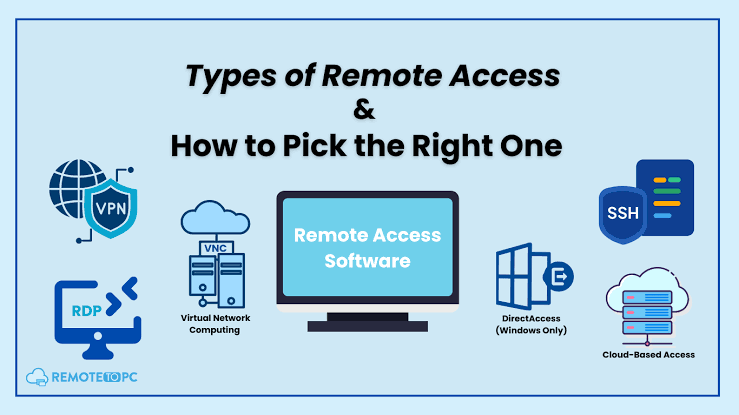
Common Types of Remote Access
There are several forms of remote access, and each one serves a different purpose.
Remote Desktop
Remote desktop technology allows a user to see and interact with another computer’s desktop. The remote computer may appear almost as though it were physically in front of the user.
This method is useful when someone needs access to specific software, files, or settings available on another machine.
Virtual Private Network
A VPN creates a protected connection between a user’s device and a private network. Once connected, an authorized user may be able to access internal resources that are not publicly available.
Businesses often use VPNs to provide employees with secure access to company systems while they are outside the office.
Remote Support
Remote support tools are commonly used by IT teams and customer support professionals. With the appropriate permission, a technician can connect to a user’s device and help troubleshoot technical problems.
This can be much faster than asking someone to explain a complicated computer issue over the phone.
Cloud-Based Access
Many modern services provide remote access through cloud platforms. Instead of connecting directly to a physical computer, users access applications and files hosted online.
Cloud-based systems have become popular because they can support users across different locations and devices.
Benefits of Remote Access for Businesses
Remote access can provide several practical benefits to organizations.
First, it supports flexible working arrangements. Employees can work from different locations without losing access to essential company resources.
Second, remote access can improve productivity. Workers do not necessarily have to wait until they return to the office to complete a task that requires a particular computer or application.
Third, it can help businesses provide faster technical support. IT staff can often identify and resolve problems remotely, which reduces the need for in-person visits.
Remote access can also help organizations maintain operations during unexpected situations. If employees cannot reach a physical workplace, secure remote systems can allow essential work to continue.
Security Challenges of Remote Access
Although remote access is useful, it also introduces security risks when it is not properly managed.
A weak password can provide an attacker with an opportunity to access an account. Public or unsecured networks may also create additional risks if sensitive connections are not properly protected.
For this reason, businesses should use strong authentication methods, keep remote access software updated, and limit access to only the resources employees actually need.
Multi-factor authentication is particularly valuable. It adds another verification step beyond a password, making unauthorized access more difficult.
Organizations should also monitor remote connections and review user permissions regularly. Former employees or users who no longer require access should have their permissions removed promptly.
Best Practices for Safe Remote Access
Security should be considered before remote access is introduced, not after a problem occurs.
Use strong and unique passwords for remote access accounts. Whenever possible, enable multi-factor authentication to provide an additional layer of protection.
Keep operating systems, applications, VPN software, and remote access tools updated. Security updates often address vulnerabilities that attackers could otherwise exploit.
Businesses should also follow the principle of least privilege. Users should receive only the access they need to perform their responsibilities.
It is also important to educate employees. Staff should know how to recognize suspicious login requests, phishing messages, and unusual security alerts.
Finally, organizations should maintain logs and monitor remote activity. Unusual login locations, repeated failed attempts, or unexpected access patterns can sometimes indicate a security problem.
Remote Access in the Future
The role of remote access is likely to continue growing as businesses become more distributed and digital services become more advanced.
Hybrid work has demonstrated that employees can remain productive without always being physically present in an office. At the same time, cloud computing and modern security technologies are making it easier to provide controlled access to business resources.
Future remote access systems are likely to focus heavily on identity verification, automated security controls, and seamless access across different devices. Instead of simply asking whether a user is connected to a company network, modern security approaches increasingly consider who the user is, what device they are using, and what resource they are trying to access.
The goal is not simply to make remote connections possible. It is to make them convenient while maintaining strong security.
Frequently Asked Questions
1. What is remote access in simple words?
Remote access means connecting to a computer, network, or digital resource from another location. It allows an authorized person to use resources without being physically present at the location where they are stored.
2. Is remote access safe?
Remote access can be safe when it is properly configured and protected. Strong passwords, multi-factor authentication, encryption, software updates, and limited user permissions can help improve security.
3. Can I access my computer remotely?
Yes, if your computer supports remote access and the necessary settings or software are configured correctly. You should also make sure the connection is secured before using it.
4. What is the difference between remote access and a VPN?
A VPN generally creates a secure connection to a private network, while remote access can refer more broadly to connecting to a computer, server, application, or network from another location. A VPN can be one method used to support secure remote access.
5. Can businesses use remote access?
Yes. Businesses commonly use remote access to support remote employees, manage servers, provide technical assistance, and allow authorized users to reach company applications and files from outside the office.
6. Does remote access require the internet?
Many remote access solutions use the internet, although remote connections can also operate through private or local networks. The exact requirement depends on the technology and setup being used.
7. How can I make remote access more secure?
Use strong passwords, enable multi-factor authentication, keep software updated, restrict user permissions, and monitor connection activity. Avoid giving remote access privileges to people who do not need them.
8. Why is remote access useful for remote workers?
It allows remote workers to reach the computers, files, applications, and company resources they need without being physically present in the office. This can make flexible and hybrid work much easier to manage.
Conclusion
Remote access has become an important part of modern computing. It allows individuals and businesses to connect to computers, networks, applications, and files without being physically present at the location where those resources are stored.
From remote employees and IT support teams to businesses operating across multiple locations, the technology offers significant advantages in flexibility, convenience, and productivity. However, these benefits come with security responsibilities.
Using strong authentication, keeping software updated, limiting permissions, and monitoring remote connections can help reduce unnecessary risks. When implemented thoughtfully, remote access can provide a practical way to work and manage digital resources from almost anywhere.