
The internet has become an essential part of everyday life. Whether people are browsing websites, sending emails, watching videos, shopping online, or using cloud applications, they rely on a hidden system of technology working behind the scenes. One of the most important parts of this system is the Internet Servers.
Internet servers are powerful computers or software systems that store, process, and deliver information to users through the internet. Every time you open a website, download a file, send an email, or use an online application, a server is usually involved in completing that request. Although users rarely see servers directly, they are responsible for making many online services possible.
Understanding how internet servers work can help explain what happens when we enter a website address into a browser. It can also make it easier to understand web hosting, website performance, online security, and cloud computing.
What Are Internet Servers?
An internet server is a computer system designed to provide information, services, or resources to other computers connected to a network. In simple terms, a server receives a request from a user and responds by providing the requested data.
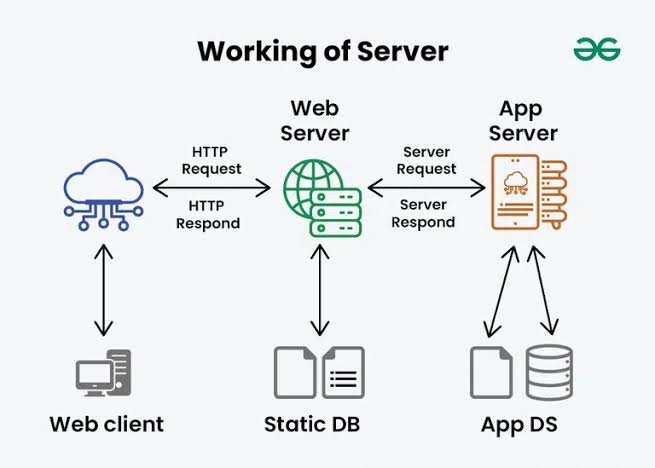
For example, when you type a website address into your browser, the browser sends a request to the server where that website is hosted. The server processes the request and sends the necessary files back to your device. Your browser then uses those files to display the website.
Servers can perform many different tasks. Some store websites, while others manage emails, databases, files, applications, or online games. Large internet services may use thousands of servers working together to handle millions of requests.
How Do Internet Servers Work?
The basic process is easier to understand with a simple example. Suppose you want to visit a news website.
First, you enter the website’s domain name into your browser. The browser needs to determine where that website is located, so the domain name is translated into an IP address through the Domain Name System, commonly known as DNS.
Once the browser knows the server’s IP address, it sends a request to that server. The server receives the request and determines what information needs to be provided. It may retrieve files from storage or request information from a database.
The server then sends a response back to your browser. This response may contain HTML, CSS, JavaScript, images, videos, or other types of data. The browser processes the information and displays the final webpage on your screen.
This entire process can happen within seconds, which is why modern internet services can feel almost instantaneous.
Common Types of Internet Servers
There are several types of internet servers, and each one has a specific purpose. Some websites use multiple types of servers at the same time.
Web Servers
Web servers are responsible for delivering websites to users. They receive requests from web browsers and send back webpage files.
Popular web server software includes Apache and Nginx. Web servers can serve static content, such as images and HTML files, as well as work with applications that generate content dynamically.
Mail Servers
Mail servers handle email communication. When you send or receive an email, mail servers help transfer and store those messages.
Different protocols are used for different parts of email communication. For example, SMTP is commonly used to send email, while protocols such as IMAP and POP are used to access messages.
File Servers
File servers are designed to store and manage files. They allow authorized users or systems to upload, download, access, and share documents and other digital resources.
Businesses often use file servers to organize company documents and provide employees with controlled access to shared files.
Database Servers
Database servers store and manage structured information. Websites and applications frequently rely on databases to store customer accounts, product information, orders, posts, and other data.
When you log into an online service, for example, an application may communicate with a database server to verify your account information.
DNS Servers
DNS servers help translate human-friendly domain names into IP addresses. People can easily remember names such as a website domain, but computers communicate using numerical IP addresses.
Without DNS servers, users would have to remember IP addresses for the websites they wanted to visit.
Application Servers
Application servers provide the environment needed to run specific applications and business logic. They can process user requests, communicate with databases, and generate dynamic content.
Many modern online platforms use several application servers to distribute workloads and improve reliability.
Why Are Internet Servers Important?
Internet servers are important because they provide the infrastructure needed for online communication and services. Without servers, websites and many internet-based applications would not be able to deliver information to users.
Businesses depend on servers for online stores, payment systems, customer accounts, internal applications, and communication. Educational institutions use them for learning platforms and digital resources. Individuals use server-based services whenever they browse websites, store files online, or communicate through internet applications.
Servers also make it possible to scale online services. Instead of one computer handling every request, organizations can use multiple servers to distribute the workload. This approach helps services support large numbers of users.
Internet Servers and Website Hosting
Website hosting is closely connected to internet servers. When someone creates a website, its files need to be stored on a server that can make those files available to visitors.
Hosting providers offer different types of server environments. Shared hosting allows multiple websites to use resources on the same server. Virtual private servers provide a more isolated environment, while dedicated servers give a customer an entire physical server.
Cloud hosting is another popular option. Instead of depending on a single physical machine, cloud-based systems can use resources from multiple connected servers. This can provide flexibility and help websites handle changes in traffic.
The right hosting solution depends on factors such as website size, expected visitors, performance requirements, security needs, and budget.
Internet Server Security
Because servers are connected to the internet, security is extremely important. A poorly protected server can become a target for attackers who may try to steal information, disrupt services, or gain unauthorized access.
Server security can involve several layers of protection. Strong authentication helps prevent unauthorized accounts from being accessed. Firewalls can control network traffic, while encryption protects sensitive information during transmission.
Regular software updates are also essential because outdated server software may contain known security weaknesses. Administrators should monitor server activity and maintain reliable backups so that important information can be recovered if something goes wrong.
Security is not a single action. It requires continuous monitoring, maintenance, updates, and careful configuration.
Server Performance and Reliability
The quality of an internet service often depends on how well its servers perform. A slow or overloaded server can cause websites and applications to take longer to respond.
Several factors influence server performance, including processing power, memory, storage speed, network capacity, and software configuration. Organizations can improve performance by optimizing applications, using caching, distributing traffic across multiple servers, and upgrading hardware when necessary.
Reliability is equally important. Large online services often use redundant systems so that if one server fails, another server can continue handling requests. Load balancing can distribute traffic among multiple servers, reducing the pressure on individual machines.
These techniques help keep websites and applications available even when traffic increases or hardware problems occur.
The Future of Internet Servers
Internet servers continue to evolve as online services become more advanced. Cloud computing, virtualization, edge computing, automation, and artificial intelligence are changing the way organizations manage server infrastructure.
Edge computing, for example, moves certain computing resources closer to users. This can reduce the distance data needs to travel and potentially improve response times for applications that require fast communication.
Automation is also becoming increasingly important. Modern organizations can automatically deploy applications, monitor server health, adjust resources, and respond to changing demand.
As more devices and services connect to the internet, servers will remain an essential part of the digital world. Their technology may change, but their fundamental role of processing, storing, and delivering information will continue to be important.
Frequently Asked Questions
1. What are Internet Servers?
Internet servers are computer systems or software designed to provide data, resources, or services to other devices over a network. They can host websites, manage emails, store files, operate databases, and run applications.
2. How does an Internet Server work?
An internet server receives a request from a user’s device, processes that request, and sends the required information back. For example, a web server can receive a browser request and return the files needed to display a webpage.
3. What is the difference between a server and a regular computer?
A server is designed to provide services or resources to other devices and is generally optimized for continuous operation, networking, security, and handling multiple requests. A regular personal computer is usually designed primarily for direct use by an individual.
4. What are the main types of Internet Servers?
Common types include web servers, mail servers, file servers, database servers, DNS servers, and application servers. Each type performs a different function, although one physical machine can sometimes perform multiple roles.
5. Why are servers important for websites?
Websites need servers to store their files and deliver those files to visitors. When someone visits a website, the server processes the request and sends the necessary content to the visitor’s browser.
6. Are Internet Servers secure?
Internet servers can be secure when they are properly configured, updated, monitored, and protected. Security measures such as firewalls, encryption, strong authentication, backups, and regular updates can reduce security risks.
7. What is server hosting?
Server hosting is a service that provides the infrastructure needed to store and run websites, applications, or other online services. Hosting can include shared servers, virtual private servers, dedicated servers, and cloud-based environments.
8. Will Internet Servers remain important in the future?
Yes. As more websites, applications, connected devices, and online services depend on the internet, servers will remain essential. New technologies such as cloud computing, edge computing, virtualization, and automation will continue to change how servers are used and managed.
Conclusion
Internet servers are the backbone of many services people use every day. From websites and email to databases, online applications, cloud platforms, and digital storage, servers make it possible for information to move between users and online services.
Although the technology behind servers can be complex, the basic idea is simple: a server receives requests, processes them, and provides the appropriate resources or information. Different types of servers perform different jobs, and modern systems often combine many servers to provide better speed, security, and reliability.
As internet usage continues to grow, the demand for powerful, secure, and efficient servers will also increase. Understanding their role gives us a better picture of what happens behind the websites and applications we use every day.