
Cloud applications have become an important part of modern business and everyday digital life. From storing personal files and communicating with teams to managing customers and analyzing business data, people rely on cloud-based software more than ever before. Instead of installing everything on a local computer or maintaining expensive physical servers, users can access cloud applications through the internet from almost anywhere.
The growing popularity of cloud technology is not surprising. Businesses want flexible tools that can scale as they grow, while employees need applications that support remote and hybrid work. Cloud applications provide a practical way to meet these needs while reducing the burden of maintaining traditional IT infrastructure.
What Are Cloud Applications?
Cloud applications are software programs that run partly or entirely in a cloud computing environment. Rather than depending solely on a user’s computer or an organization’s physical servers, these applications use remote servers, storage, databases, and other cloud resources.
Users generally access a cloud application through a web browser, mobile app, or dedicated software interface. The processing and data storage may happen on remote cloud infrastructure instead of directly on the user’s device.
Popular examples include online email platforms, cloud-based accounting software, project management tools, customer relationship management systems, video conferencing platforms, and online file storage services.
One of the biggest advantages is accessibility. As long as users have an internet connection and the appropriate permissions, they can often access their applications and information from different devices and locations.
How Do Cloud Applications Work?
Cloud applications rely on a combination of cloud infrastructure, software, networking, storage, and databases. When a user interacts with a cloud application, their request is sent over the internet to the cloud environment where the application processes it.
For example, when someone edits a document using an online productivity application, the document may be stored on remote cloud servers. Changes can be processed and synchronized through the cloud, allowing the user to access the latest version from another device.
Cloud applications can use different architectural models. Some applications are almost completely cloud-based, while others combine local software with cloud services. This flexibility allows organizations to select an approach that fits their technical and business requirements.
Cloud providers typically handle much of the underlying infrastructure, including servers, networking, storage, maintenance, and system availability. This allows companies to focus more on using their applications rather than managing physical hardware.
Types of Cloud Applications
Cloud applications can be found across almost every industry. Although their features vary, several categories are particularly common.
1. Business Applications
Businesses use cloud applications for accounting, human resources, customer relationship management, enterprise planning, and other operational activities. These tools can help employees work with shared information without relying on a single physical location.
2. Collaboration Applications
Collaboration tools allow employees and teams to communicate, share documents, manage projects, and coordinate tasks. They are especially useful for remote and hybrid workplaces where team members may work from different cities or countries.
3. Storage and Backup Applications
Cloud storage applications allow users to save files remotely instead of depending entirely on local hard drives. Cloud backup tools can also help organizations protect important information against hardware failure, accidental deletion, and other problems.
4. Communication Applications
Email, messaging, voice calling, and video conferencing platforms are common examples of cloud applications. These services make it easier for individuals and organizations to communicate without maintaining complex communication infrastructure themselves.
5. Industry-Specific Applications
Many cloud applications are designed for specific industries. Healthcare providers, educational institutions, financial organizations, retailers, and manufacturers can use specialized cloud software to manage processes that are unique to their fields.
Benefits of Cloud Applications
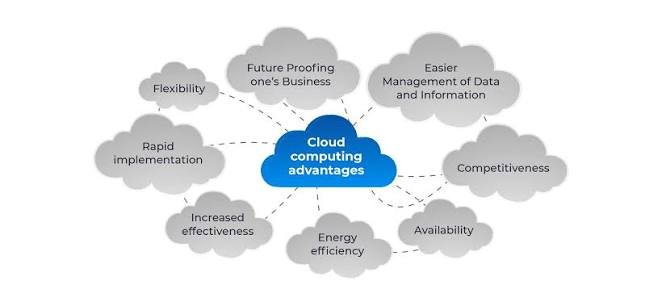
The increasing adoption of cloud applications is largely driven by their practical benefits. While the exact advantages depend on the application and provider, several benefits are common.
Accessibility
Cloud applications can usually be accessed from multiple locations and devices. This makes them particularly useful for businesses with remote employees, traveling professionals, and distributed teams.
Scalability
Traditional software and infrastructure can require significant planning when a company grows. Cloud applications often provide more flexible scaling options. Organizations can increase resources or user capacity when demand rises and reduce them when demand falls.
Lower Infrastructure Requirements
With traditional applications, businesses may need to purchase and maintain servers, storage systems, networking equipment, and other hardware. Cloud applications can reduce the need for organizations to manage this infrastructure themselves.
Automatic Updates
Many cloud applications are updated by the service provider. This can reduce the need for users to manually install every update and can help organizations access new features and security improvements more efficiently.
Collaboration
Because information is stored and managed through centralized cloud systems, multiple authorized users can often work with the same data or documents. This can improve teamwork and reduce problems caused by outdated or duplicate files.
Cost Flexibility
Cloud services frequently use subscription or usage-based pricing models. Instead of making a large upfront investment in hardware and software, organizations may pay according to their selected service level and usage.
Cloud Applications and Security
Security is one of the most important considerations when adopting cloud applications. Moving software and data to the cloud does not automatically make them secure or insecure. Security depends on the provider, application design, configuration, user behavior, and organizational policies.
Cloud application security may include encryption, identity management, access controls, authentication systems, monitoring, backups, and security testing.
Organizations should carefully control who can access sensitive information. Strong passwords, multi-factor authentication, role-based permissions, and regular security reviews can reduce unnecessary risks.
It is also important to understand the provider’s security policies and compliance practices before choosing a cloud application. Businesses dealing with sensitive customer, financial, or healthcare information may have additional legal and regulatory requirements.
Cloud Applications for Remote Work
The rise of remote work has significantly increased the importance of cloud applications. Employees no longer need to be physically present in the same office to access many of the tools required for their jobs.
Cloud-based communication, project management, document sharing, customer management, and productivity applications can help teams remain connected across different locations.
For example, a marketing team can manage a campaign through a cloud project management platform while sharing files through cloud storage and communicating through online messaging or video conferencing tools.
This connected environment can make remote work more practical and can also help companies recruit talent from a wider geographic area.
Challenges of Cloud Applications
Despite their advantages, cloud applications also have limitations. Organizations should understand these challenges before moving important operations to the cloud.
Internet Dependency
Many cloud applications require a reliable internet connection. If connectivity is poor or unavailable, users may have difficulty accessing important systems.
Data Privacy
Organizations must understand where their data is stored, who can access it, and how it is protected. Poor configuration or weak access controls can create privacy and security risks.
Vendor Dependence
Moving important business processes to a cloud provider can create dependency on that provider. Organizations should consider service reliability, pricing changes, data portability, and exit strategies before committing to a platform.
Performance Issues
Cloud application performance can sometimes be affected by network conditions, server capacity, application design, or high user demand. Choosing an appropriate provider and architecture can help minimize these issues.
How to Choose the Right Cloud Application
Choosing a cloud application should begin with the organization’s actual requirements rather than simply selecting the most popular product.
First, identify the main problem the application needs to solve. Then evaluate important factors such as features, pricing, scalability, security, integrations, reliability, customer support, and ease of use.
Data protection should receive particular attention when the application handles sensitive information. Organizations should also consider whether the application can integrate with existing systems.
A trial or demonstration can be useful before making a long-term commitment. It allows employees to test the interface, workflows, and overall usability.
The Future of Cloud Applications
Cloud applications are expected to remain an important part of digital transformation. As businesses continue adopting remote work, automation, artificial intelligence, and data-driven processes, demand for flexible cloud software is likely to continue.
Artificial intelligence is already being incorporated into many cloud applications to automate repetitive tasks, generate insights, improve customer support, and assist employees with everyday work.
Another important trend is the development of more specialized cloud services. Instead of using one general-purpose system for everything, organizations may combine multiple cloud applications designed for specific business functions.
Cloud applications are also likely to become more integrated. Better connections between business systems can help organizations move information between departments and reduce manual data entry.
Frequently Asked Questions About Cloud Applications
1. What are cloud applications?
Cloud applications are software programs that use cloud computing resources to provide services to users. They are typically accessed through the internet using a web browser, mobile application, or dedicated software.
2. What is an example of a cloud application?
Examples include online email services, cloud storage platforms, project management systems, customer relationship management software, video conferencing applications, and online accounting tools.
3. Are cloud applications secure?
Cloud applications can be highly secure when they are properly designed, configured, and managed. Security depends on factors such as encryption, authentication, access controls, monitoring, provider security practices, and user behavior.
4. What are the main benefits of cloud applications?
Major benefits include easy accessibility, scalability, reduced infrastructure requirements, flexible costs, automatic updates, and improved collaboration between users and teams.
Conclusion
Cloud applications have changed the way people use software and manage digital information. By moving applications and resources to cloud environments, organizations can gain greater flexibility, accessibility, scalability, and collaboration.
However, successful cloud adoption requires more than simply choosing an online application. Businesses need to consider security, privacy, reliability, costs, integration, and long-term vendor relationships.
As technologies such as artificial intelligence, automation, and advanced analytics continue to develop, cloud applications will likely become even more capable. For businesses and individuals looking for flexible digital tools, understanding how cloud applications work and what they offer is an important step toward making better technology decisions.